50+ Good Intellectual Witty Status Updates for Facebook


Status Quotes and updates and the primary thing everyone loves to share on facebook, it can be from one of their earlier inspiration, maybe his or her professors or some ancient nerds, but these quotes really preach us a very good lesson some are just for fun like our 101 funny hilarious status updates for facebook. Those are just for fun but below are the Witty status updates so basically these are the master ones and really knowledgeable, check it out and do share them. via - duke.edu
One of the best feelings in the world is emptying your pockets in the evening, and knowing you can leave all the junk there until the next day.
  1. Those who have guinea pigs never have to throw out any vegetables.
  2. If you wear a silly hat, everyone knows who you are.
  3. No one likes a smartass
  4. Especially another smartass.
  5. Unless they have their own TV show, then they're a comic genius.
  6. Arguing with a zealot is only slightly easier than tunneling through a mountain with your forehead.
  7. Anyone capable of getting themselves elected president has shown that they should not be allowed to do the job. (Apologies to Douglas Adams)
  8. Violence is the last refuge of the incompetent. (Isaac Asmiov)
  9. Right, because usually the compentent don't wait that long. (Jerry Pournelle)
  10. Once is chance, twice is a coincidence, three times is an enemy action. (Ian Fleming, Goldfinger)
  11. Never turn your back on a charging turtle.
  12. Never get in a spitting contest with a llama.
  13. Projectile vomiting rarely gets you a return invitation anywhere.
  14. Never throw toilet paper on a bear.
  15. Hyenas laugh becasue they know what's coming next.
  16. Shooting yourself in the foot is actually a lot more fun than it sounds.
  17. Shooting yourself in the foot is actually a lot less fun than nearly anything else.
  18. Calling your mother and pretending to be an encyclopedia salesman doesn't go over too well.
  19. The prime motivation for all human behavior is the need to feel superior to someone else.
  20. He who laughs last should do so from a safe distance.
  21. Do not taunt Happy Fun Ball.
  22. The words "My" "Rash" "See" and "Wanna" don't go well together in a sentence.
  23. When given a choice, people will always do the dumbest thing under the circumstances.
  24. The IQ of a mob can be determined by taking the IQ of the dumbest member, and dividing by the number of members.
  25. Therefore: The larger the number of people, the stupider the resultant decisions and actions (congress anyone?)
  26. Never ever go first.
  27. When being stalked by an angry mob with raspberries, the first thing to do is to release a tiger. (Monty Python)
  28. Rain on your wedding day is NOT ironic unless you're made of sugar.
  29. Never take yourself too seriously, and mock those who do.
  30. Also be sure to mock people who take themselves too seriously.
  31. Those who never take anything too seriously have a distinct advantage over those who do.
  32. The more you understand, the crazier you get.
  33. Bad losers make worse winners.
  34. The quickest way to make someone ignore you is to start a sentence with "You should ..."
  35. People who habitually give advice are the worst people to take advice from.
  36. If you insist on getting your way often enough, pretty soon you won't have to argue with anyone about it anymore.
  37. Peoples' names should not be verbs or adjectives.
  38. There's nothing wrong with the world that shooting 99% of the population wouldn't cure.
  39. All indicators show that the human race is selectively breeding itself for stupidity.
  40. If "obscene" words were made a part of common everyday language, after a week, no one would care anymore.
  41. After two weeks, a new batch of "obscene" words will have been invented.
  42. One of the most important things to learn is when to quit while you're ahead.
  43. Most people never learn.
  44. Anyone who says exactly what you want to hear knows it.
  45. Anger is easy, anger at the right person, at the right time, for the right reason, that's hard. (Ulysses)
  46. You can live for many causes, but you can only die for one. Pick that one very carefully.
  47. Never allow anything to be named after you until you're safely dead.
  48. No corpse, no death. (DC Comics)
  49. Even if there is a corpse, they still may not be dead. (DC Comics)
  50. Don't believe everything you read in comic books.
  51. Dying is easy, living is hard.
  52. You can always get more with a kind word and a 2-by-4 than with just a kind word. (Marcus)
  53. The beauty of the American system of government is that you could wipe out the executive, legislative, and judicial branches, and 99% of the population wouldn't notice.
  54. If you always tell the truth, people will stop believing you. (based on Richard Feynman's life)
  55. Some people just never learn.
  56. Most things in this world are done for no good reason.
  57. Any gift that can't be thrown away is really a trap. (Dr. Morgenes, via Tad Williams)
How to Merge Multiple .vcf Contacts into One .vcf Contact


When ever you try to update your phone the first thing you usually take care about is the secured backup of your contacts. Contacts might be really important for you and maybe for your business too, so yesterday I just bought my new iPhone 5, well yes I know I was really interested in that phone so I just bought it another day it was released in India.
So as soon as I bought my iPhone 5 I just gave my earlier iPhone to my father who was already owning Nokia E52 so my job was to backup contacts from Nokia E52 and transfer them to iPhone 4, well I know that if I just upload a single .vcf file and open that in the iPhone it will automatically add all the contacts to your iPhone’s list.
Well I have already posted a tutorial on how you can backup your contacts on your iPhone and transfer them anywhere using that single .vcf file. But the deal was to get contacts backed up from Nokia E52 and transfer them to iPhone, well the process was easy to backup contacts on Nokia device as I just backed them up in the memory card but the problem was that I got every contact in a separate .vcf file so I just need to find a way to merge all those .vcf file into one .vcf file, so after searching a lot on the internet, I came through a simple process.

Copy all .vcf Contacts using Command Prompt

Well this tutorial just adds another simple command prompt work around, which you can follow below as I have explained it briefly.
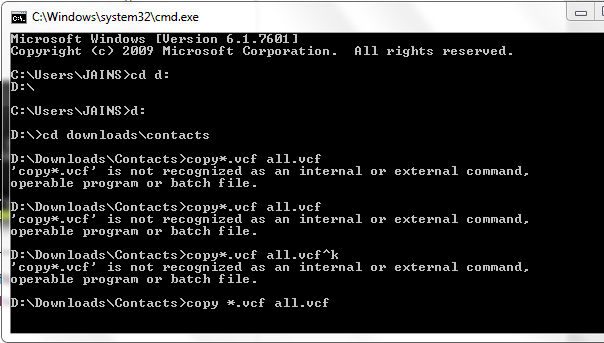
  1. Now just fire up your command prompt by pressing Ctrl + R and typing in CMD.
    merging-files-cmd
  2. Make sure your all .vcf contacts are assembled in one folder that’s kept in any drive I would prefer you to go with C:\Contacts
  3. So now your all contacts are kept at once place, now its time to merge all .vcf contacts into one single .vcf file so that it can be used on any phone and specially iPhone.
  4. Now by default your C:\ drive will be selected now if you have kept all your contacts in contacts folder that’s in C:\ drive just type down cd contacts that will open the contacts folder in CMD now execute the below command in CMD.
    copy *.vcf all.vcf
  5. Now this will command will merge all your contacts and create a single .vcf file in that same folder with the all.vcf name.
  6. Now you can just transfer that single all.vcf file to your iPhone your iPhone by mailing it or any other transferring method and as soon as you will click that file iPhone will ask you to add all those contacts to your iPhone contacts list.

How to Hide your Phone number while calling

click here
Most of you want to call someone while hiding your own phone no identity
so i am publishing the trick for hiding your ph no.

If you want to hide/show your phone number when calling, put one of these codes below in front of the number that you are going to call.
(*#30# / *#31# or *31# / #31# ) Works on most of the networks.

GSM Mobile hacking - Using SIM Cloning!

Let's talk about the fun stuff. The first trick I will discuss is an activity that is becoming quite prevalant, SIM cloning. If you have paid attention to any cell phone related tutorials in the past, then you may remember cloning being made popular by certain public figures like Kevin Mitnick in order to place calls on the bill of another subscriber. Well, even with GSM this trick still holds relevant. How could such a flaw exist in a system that is obviously concentrated on preventing such fraudulant use? The flaw is within the COMP128 authentication algorithm used as an instantiation of A3/A8 widely used by gsm providers. Unfortunately for these providers, the COMP128 algorithm is just not strong enough to prevent fraud. We attack the algorithm by using a chosen-challenge attack, which works by forming a number of specially-chosen challenges and querying the SIM card for each one. Then by analyzing the responses from these queries, we are able to determine the value of the secret key that is used for authentication. So how do we perform this attack?

Well there are a few things you need before you start. First you will need to buy a SIM card reader, a card programmer, empty silver pic 2 card, and an unregulated adapter, and if you don't have one a 9 pin male to female extension cable. You can probably put a bid on ebay for most of this hardware, or just google up some sites that sell them. You will also need some software for this trick. First you will need a SIM card editor. An excellent piece of software to use in this instance is Cardinal Sim Editor, which you can find (including the crack for it) at the below link...

http://adf.ly/EHAv0

Another tool you will is CardMaster, which once again you can find at the below link...

http://adf.ly/EHAwR

Finally what you will need is a SIM card emulator. An excellent example of an emulator to use is SIMEMU, which you can find at the below link...

http://adf.ly/EHAxW

Note for those of you who feel the need to read the instructions on the site, just go tofreetranslation to translate the web page from Spanish to English. Now let's go ahead and get started shall we. You will first want to plug your SIM Reader into your com port. Then run Cardinal and then click where it says "Click Here" and then click Settings. You will then select your com/serial port and the baud rate. Then you will close this out, and then left click where it says "Click Here", go to smartcard, and click SIM editor. The program will from there start up, and you will go to SIM, then SIM Info, and click the load button. After doing this you will see the IMSI code, take note of this code as you will need it. Now close the SIM Info and go to Security/Find key KI. When this window opens just click Start and wait. It will take approximately 4 hours to find the key. Once it is found take note of this KI and exit. Now you should have the IMSI and KI noted, if so lets continue with the next step. Now take your silver card. Within the unzipped file within you will find two files. SEE50s.hex (EEPROM) and SEF50sEN.hex (PIC). Now connect your programmer to a com port and go to the setup menu on your CardMaster program and choose the appropriate com port. You should then see a yellow rectangle at the bottom of the program that says that there is no card. Now insert your smartcard into the programmer, and the rectangle should change to green and you will see "Card ready". Now go to where it says "Card type:" and select "Silvercard". NOw go to the "File to Pic:" field and upload SEF50sEN.hex, then go to the "File to Eeprom:" field and upload SEE50s.hex. Now go to Edit and click "Auto Program". Now once this is finished you will need to cut the card so that it will fit into the phone. Instructions for how the card needs to be cut is provided on the GSM solutions web site that will be listed in the Sites to Visit section at the bottom of this page. Now insert the newly cut silvercard into the phone. If it asks for
. If it asks for a pin just punch in 111. Then from the main menu open up "Sim-Emu". Now from this menu go to Set Phone #, then -GSM #1 (or any slot), then Configure, then Edit #. Now edit GSM #X to any name, and then press ok. Now go to Config.Pos. and it will ask for PIN2, which will be 1234. It will then ask you what position you want the card to be, choose Position 1. It will then ask you for the IMSI, which you will punch in the IMSI you got from Cardinal. It will then ask you for the KI, which again you punch in the KI you got from Cardinal. It will then ask you to enter your PUK which can be anything up to 8 digits. Then it will ask you to enter your PIN which can be anything up to 4 digits. There you go, now you have cloned another SIM card, and are now free to call away all you want to on someone elses bill. There have also been rumors that on certain services there are ways to clone a SIM remotely, but none have been tested so this can't be proven. So now that we're finished talking about SIM cloning, let's get into another trick involving exploiting gsm phones, bluejacking. What is bluejacking you ask? Bluejacking is exploiting the BlueTooth wireless communication system common among PDAs, cell phones, and of course laptops. In essense this is nothing more than a harmless little prank, similar to defacing web sites. For bluejacking gsm phones what we are trying to do is first create a phonebook contact that says something like "haha I haxor3d j00r ph0n3!", and then send it to any bluetooth enabled device in the facinity. This in essense amounts up to at most a harmless little prank, but it's fun to watch their faces when they get the message. However, I won't bother explaining the details of how to bluejack, since the methods are models and manufacturer dependant, and are explained on a site that will be listed at the bottom of this tutorial. Don't believe that the possibilities for exploiting bluetooth enabled gsm phones ends there though. Another activity that we can jump onto is called bluebugging.

Bluebugging is the process of sniffing out communication from a bluetooth-enabled cell phone. Like, for example, sms messages. Yup, now you can sit in a coffee shop, open up your laptop, and spy on everyone else who is using their phone. This concept was first introduced to the world in a presentation at DefCon 11, and is now available to the public in the form of a tool called BlueSniff that works as a bluetooth wardriving utility to play big brother. Go to the below address to get a copy of this tool...

http://adf.ly/EHB1H

Another nice tool to use for such means is btscanner, which can be used to gather as much information as possible on a bluetooth-enabled device. Yet again, this wonderful tool can be found at the below address...

http://adf.ly/EHB2W

Get Kon-Boot to Hack user password


Kon-Boot is an prototype piece of software which allows to change contents of a Linux kernel (and now Windows kernel also!!!) on the fly (while booting).
In the current compilation state it allows to log into a Linux system as ’root’ user without typing the correct password or to elevate privileges from current user to root. For Windows systems it allows to enter any password protected profile without any knowledge of the password.
It was mainly created for Ubuntu, later the author has made a few add-ons to cover some other Linux distributions.
Entire Kon-Boot was written in pure x86 assembly, using old grandpa-geezer TASM 4.0.
Latest Updates – Kon-Boot for Windows
Kon-Boot was moved to Windows platforms. So now it provides support for Microsoft Windows systems and also the Linux systems listed below. Kon-Boot for Windows enables logging in to any password protected machine profile without without any knowledge of the password. This tool changes the contents of Windows kernel while booting, everything is done virtually – without any interferences with physical system changes. So far following systems were tested to work correctly with Kon-Boot:
  • Windows Server 2008 Standard SP2 (v.275)
  • Windows Vista Business SP0
  • Windows Vista Ultimate SP1
  • Windows Vista Ultimate SP0
  • Windows Server 2003 Enterprise
  • Windows XP
  • Windows XP SP1
  • Windows XP SP2
  • Windows XP SP3
  • Windows 7
No special usage instructions are required for Windows users, just boot from Kon-Boot CD/Floppy, select your profile and put any password you want. You lost your password? Now it doesnt matter at all.
It has been tested with the following Linux distributions:
  • Gentoo 2.6.24-gentoo-r5 GRUB 0.97
  • Ubuntu 2.6.24.3-debug GRUB 0.97
  • Debian 2.6.18-6-6861 GRUB 0.97
  • Fedora 2.6.25.9-76.fc9.i6862 GRUB 0.97
You can download Kon-Boot here:
Floppy Image – FD0-konboot-v1.1-2in1.zip
CD ISO Image – CD-konboot-v1.1-2in1.zip